
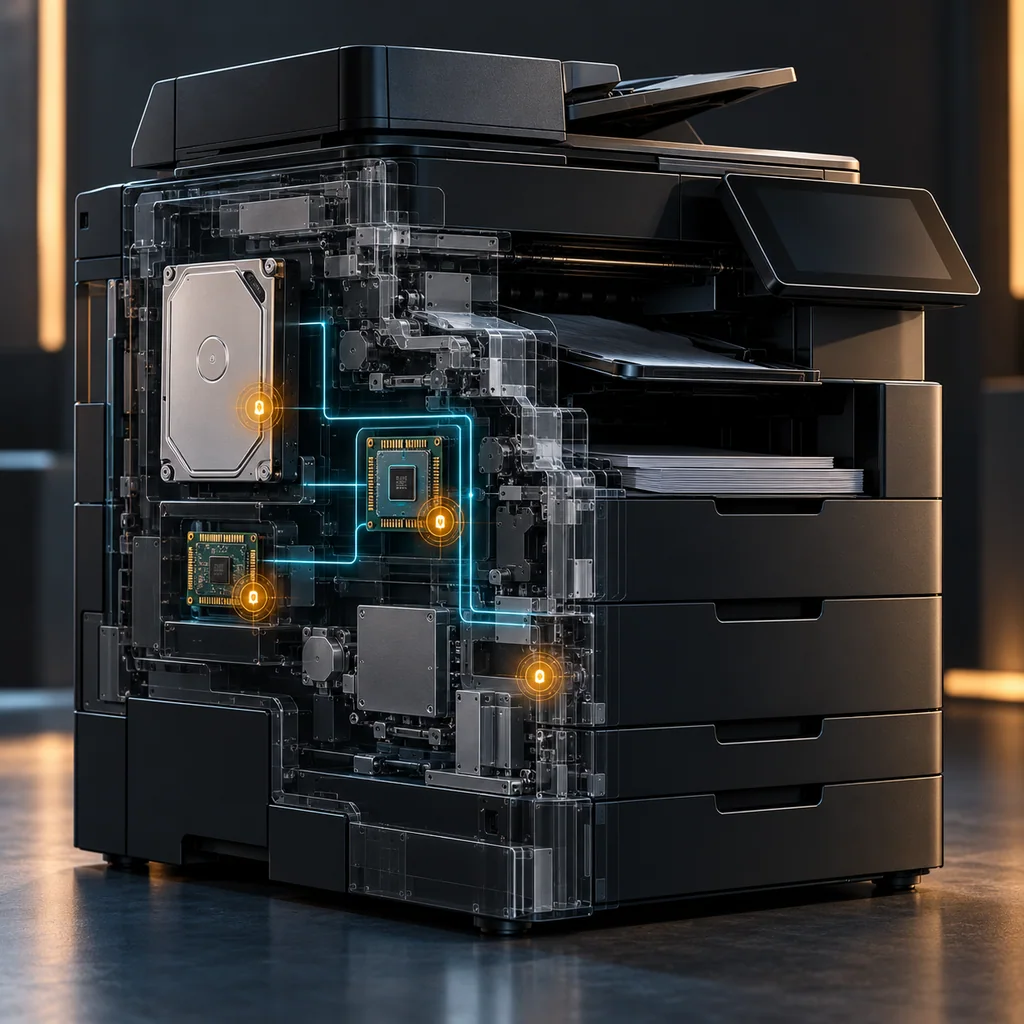
Printer and Copier Sanitization: Map Every Storage Location
Short answer
Sanitize a printer or copier by its complete storage inventory and model-specific retirement procedure. Erasing a visible hard drive or clearing a job queue does not by itself establish removal of saved documents, configuration, credentials or data on another storage component. Start with the exact model, installed options and firmware; map each retained-data category to an explicitly supported treatment and acceptance check.
Keep job-data deletion, temporary-file policy, device initialization and whole-device retirement separate. If a required storage location cannot be covered or verified, record an exception and retain control of the affected component. Do not close the asset because its control panel now looks empty.
Who this is for
This guide is for authorized ITAD teams, office-equipment administrators and organizations returning leased multifunction printers. It provides a scope and acceptance workflow. It does not supply a universal factory-reset command or a disassembly procedure.
A concrete architectural example is HP's LaserJet Managed MFP Hard Disk Security white paper, version 2.0, June 2019. It covers specified families including E725xx and E778xx. It describes separate engine-controller and formatter storage, with HDD/eMMC options and different job-data functions. Treat that as a dated, family-scoped example, not a statement that every current printer has that architecture or those menu choices. Obtain the documentation that matches the actual product and firmware before acting.
When to use this
Use this workflow before resale, lease return, a storage-bearing board replacement or transfer to another organization. Begin while the machine is still identifiable and accessible through its authorized administration path. If a vendor must handle the job, settle storage ownership, scope and evidence responsibilities before collection.
A return receipt answers who received the equipment. It does not establish which retained-data locations were sanitized. A service agreement should identify what happens when the normal retirement function cannot finish, a board is missing or a storage option differs from the expected configuration.
When not to use this
Do not erase a device while preservation requirements, ownership or the need to retain business records remain unresolved. Do not remove a leased drive without authorization or assume the lease transfers permission to destroy it. Do not experiment with reset menus on a production device that is still accepting work.
This article does not change a network configuration or prescribe network isolation commands. The retirement owner should coordinate the existing authorized shutdown of incoming work and connected workflows so the machine is not repopulated during the process.
Workflow
1. Identify the machine and installed storage
Record the exact model, serial number, firmware build and installed storage options. Preserve the identity before changing settings. Request the model's storage description or statement of volatility, and distinguish observed hardware from assumptions based on another unit in the fleet.
Build a component ledger. Give separate entries to each documented nonvolatile location that may retain in-scope data. For an uncertain module, write what is unknown and what evidence would resolve it. A ledger is a proposed working aid, not a substitute for the manufacturer's architecture description.
Do not presume all nonvolatile memory stores customer documents. Some components may contain only firmware under the documented design. Equally, do not presume that a firmware label proves a component never holds customer-configured information. The decision needs a component-specific basis.
2. Separate document data from configuration
Ask which functions the machine actually used: retained print jobs, scanning, copying, fax storage or user-managed document folders. Record relevant categories without copying document content into the retirement record. For each category, identify its documented storage location and the retirement function intended to cover it.
Make a separate list for configuration and authentication material where applicable: address-book destinations, accounts, installed solutions and certificates or credentials. A method that addresses job files may not address these categories. Conversely, restoring settings does not establish a physical erase of document storage.
The FTC's copier guidance emphasizes retained document data and responsibility across purchase, lease and disposal. Its lifecycle advice is useful for defining who must act; its older technical descriptions are not a model-specific sanitization guarantee for flash or current firmware.
3. Match each action to its documented scope
In the dated HP example, temporary-file handling, Erase Job Data and pre-boot disk erase are distinct functions. Formatter eMMC job-data erasure uses a cryptographic route; disk initialization is not presented as secure customer-data removal. Some disk-erasure operations also remove operating software and require firmware reinstallation. These distinctions illustrate why similar-looking menu labels cannot be treated as interchangeable.
For the actual device, write the action name, applicable storage type, covered data, excluded data and required postconditions before execution. Record which manual revision and firmware context support that mapping. Do not borrow the HP example's procedure for a different manufacturer or family.
If the documentation gives only a broad “reset” label, obtain clarification rather than guessing that it includes all storage. If treatment depends on encryption, verify the documented prerequisites and scope; an encryption status indicator alone does not account for every key or prior plaintext copy.
4. Prepare for loss of access and configuration
Agree who may authorize the irreversible operation and what business records must be preserved elsewhere. Ensure recovery resources for intended reuse are available if the approved treatment removes operating software. Preserve only necessary administrative evidence, not an unnecessary export of sensitive address books or stored jobs.
Decide how progress, completion and failure will be recorded if the device reboots or loses its former management settings. A screenshot taken before execution shows a selection, not its result. Define the result record in advance so a disappearing session cannot be mistaken for completion.
5. Perform only the supported procedure
The authorized operator should follow the exact current instructions for the identified hardware and firmware. Keep the asset linked to the chosen action and record its terminal status or documented completion indication. Do not substitute a faster initialization function because the intended function is unavailable.
If a process stops, preserve the observed state and return the item to an exception lane. Do not repeatedly power-cycle an unknown operation to obtain a clean-looking screen. Obtain the supported recovery or alternative disposition decision for that model.
Physical removal creates a custody obligation for the removed component. A drive separated from its printer remains a data-bearing object until its own treatment and acceptance are established. The printer's shipping paperwork should not hide an untracked drive on a workbench.
6. Verify by category and close the scope
Inspect the documented postconditions for each selected action. Confirm accessible saved-job areas and configuration categories as appropriate, without publishing their former contents. Bind the outcome to the correct component and action in the ledger.
Visible absence is a useful operational check, but it cannot establish erasure of hidden physical storage. Combine the observations with method suitability, completion evidence and known exclusions. A ready screen after reboot is neither a full storage inventory nor a laboratory recovery assessment.
Reconcile every component entry. Mark covered, excluded by an approved scope decision, or unresolved. Release the machine only under the owner's accepted disposition process, with any separately removed storage accounted for.
Verification checklist
- Exact device, firmware and installed options recorded.
- Storage locations and data categories mapped separately.
- Supported retirement actions distinguished from queue deletion and initialization.
- Required operating-software recovery resources available for intended reuse.
- Completion and failure evidence linked to each action.
- Removed components remain identified and controlled.
- Unresolved scope is visible to the acceptance reviewer.
- Final release decision names the actual asset and destination.
Verification note: acceptance criteria
No printer, board or storage device was tested for this article. For an actual model, the acceptance package should contain the component map, applicable instructions, selected action, result and limitations. The HP architecture example establishes a documented distinction, not a completed field observation on a customer's unit.
For a fictional two-storage-location case, a successful record for location A cannot close location B when its storage type or treatment is unknown. Keep that distinction in the record even if both locations belong to one enclosure. The example is an administrative reasoning aid, not an assertion about a particular installed printer.
Resale and evidence checklist
Settle ownership of the machine, drives and replacement boards before treatment. Keep reusable equipment separate from components assigned to controlled disposal. Preserve the acceptance record and custody transfer while avoiding unnecessary retention of confidential configuration exports.
Do not describe a unit as sanitized solely because firmware was reinstalled or its job list is blank. State which retirement scope was accepted and which component, if any, was handled separately.
What not to publish
Exclude customer serial numbers, address books, document names, fax numbers, credentials and internal destinations from public examples. Do not publish an old “government erase standard” marketing label as proof of present-day compliance. No upcoming CliDeck software capability, supported-printer list or certification is established here.
Common mistakes
Common errors include treating the main HDD as the entire device, confusing a temporary-file setting with a retirement operation, overlooking stored jobs and assuming all factory-reset labels have the same coverage. Another is collecting sensitive data as evidence when a category-level record would suffice.
Prevent these errors by separating identity, architecture, action and outcome. A more impressive certificate cannot repair an incomplete storage inventory.
CliDeck workflow fit
A repeatable checklist can preserve component scope and result evidence through technician handoffs. Keep any relevant intake record tied to the asset and distinguish identification evidence from sanitization evidence. This workflow advice does not imply that a terminal session can verify inaccessible flash or replace a supported printer retirement function.
FAQ
Does removing the HDD sanitize the copier?
It removes one component from the enclosure. Determine whether other storage is in scope and separately account for the removed drive's treatment.
Does a blank job queue prove all saved documents are gone?
No. Queue state, retained jobs and physical data-removal coverage are different questions.
Can a 2019 menu procedure be used on any current HP printer?
No. The example is limited to its documented families and storage options. Obtain instructions matching the actual hardware and firmware.
Related guides
Review eMMC storage-area scope, SPI NOR and separate registers, and cryptographic erase prerequisites. Use the failed-device exception workflow when normal treatment cannot finish.