
Command Handoffs: How to Pass Terminal Work to Another Engineer Safely
Short answer
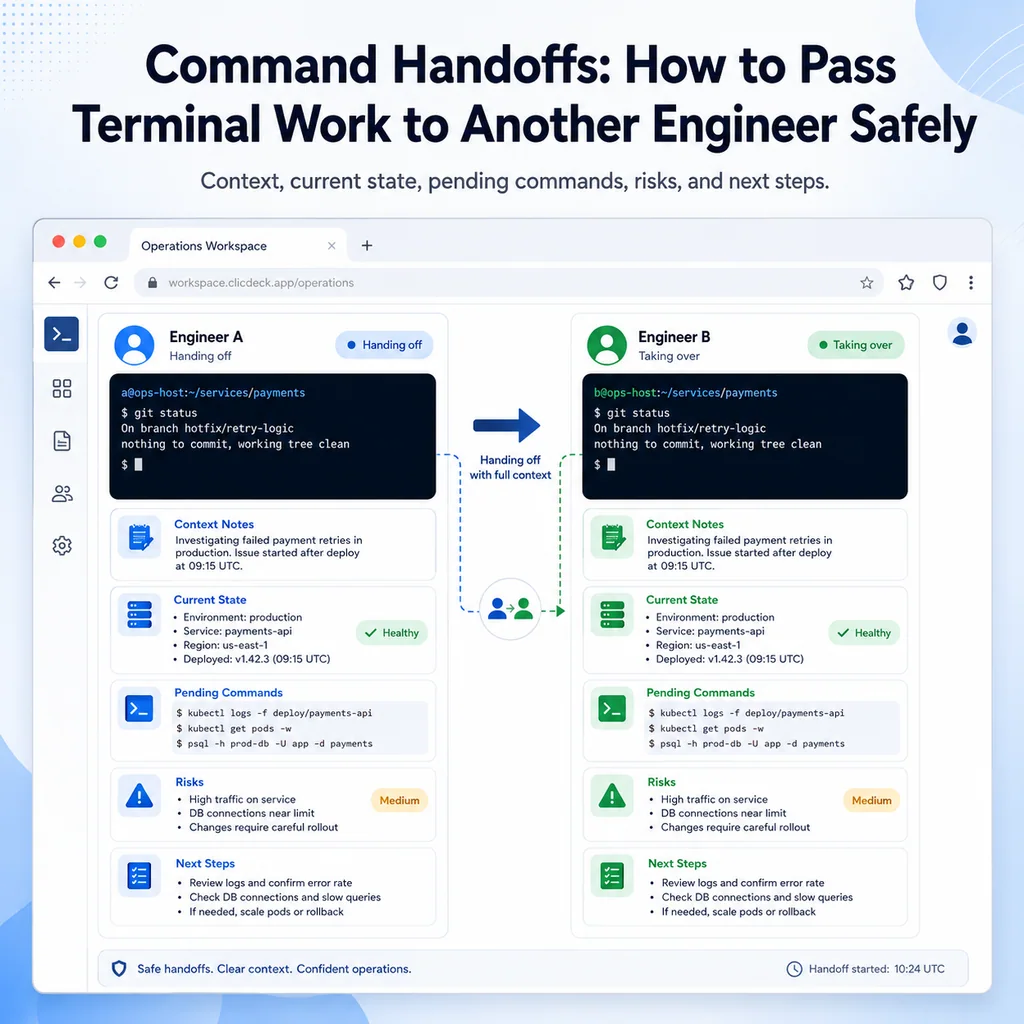
A safe terminal handoff tells the next engineer where the session is connected, why the work started, what has changed, what remains, and what to verify before typing. That context prevents the next operator from guessing at the target, state, or risk.
Why command handoffs are risky
Terminal work often happens under pressure. A service is down. A network change is half-finished. A firmware upgrade is still rebooting. A switch is reachable only through console. Someone has to leave, and another engineer takes over.
That moment is risky because the terminal does not explain the situation.
A prompt like this looks simple:
admin@app-03:~$
But the real state may be:
- A service was restarted but not verified.
- A config file was edited but not reloaded.
- A package upgrade is waiting for a reboot.
- A route was added temporarily.
- A network device has unsaved running configuration.
- A long copy or backup is still running.
- SSH is unstable and console is the only reliable recovery path.
- The previous engineer found a likely cause but did not make the change yet.
Without a clear handoff, the next engineer is forced to guess. Guessing in a terminal session is where mistakes happen.
What a command handoff should accomplish
A command handoff should answer five questions:
- Where am I?
- What problem are we solving?
- What has already happened?
- What must not be done accidentally?
- What should happen next?
If the handoff does not answer those questions, it is incomplete.
A weak handoff sounds like this:
I’m in. Looks like VLAN issue. You can continue.
A useful handoff sounds like this:
Connected to core-sw-02 over serial console through rack controller port 4.
Current mode: privileged EXEC, not config mode.
Problem: management VLAN 40 is unreachable from jump-01.
Commands run: show interfaces trunk, show vlan brief, show logging | last 50.
Finding: VLAN 40 is missing from trunk Gi1/0/24.
No changes made yet.
Next step: confirm approval before adding VLAN 40 to trunk.
Do not reload. Console is the only confirmed access path.
The second version gives the next engineer a safe starting point.
Start with target identity
Every handoff should identify the exact system.
For Linux or Unix-like systems, capture:
hostname
hostname -f
whoami
pwd
date
ip addr show
For network devices, useful checks may include:
show running-config | include hostname
show version
show inventory
show clock
show users
show ip interface brief
For serial console sessions, include the console path:
Access path: serial console through rack controller port 4
Prompt: core-sw-02#
Rack label: core-sw-02
A target note should look like this:
Target:
Environment:
Role:
Access path:
Current user / privilege:
Current directory / CLI mode:
Example:
Target: app-03
Environment: production
Role: application server
Access path: SSH through jump-01
Current user / privilege: deploy user, sudo available
Current directory / CLI mode: /opt/app/current
If the prompt, hostname, rack label, or ticket does not match, the handoff should say that clearly and stop the work.
For a deeper target-verification workflow, see How to Avoid Working on the Wrong Server or Network Device.
Explain the original goal
Do not assume the next engineer knows why the session exists.
Write the goal in one sentence:
Goal: restore SSH access to core-sw-02 from the management jump host.
Goal: reload nginx after certificate renewal, but only after config validation and traffic drain approval.
Goal: complete firmware upgrade verification on edge-fw-02 after reboot.
The goal keeps the next engineer from focusing on the wrong symptom.
A handoff without a goal often causes duplicate work. The new engineer may repeat checks, reopen solved questions, or make a change that no longer matches the real problem.
Separate observations from changes
A good handoff makes a clear distinction between what was observed and what was changed.
Use labels:
Observed:
Changed:
Verified:
Example:
Observed:
nginx config test failed because ssl_certificate pointed to an old path.

Changed:
Updated /etc/nginx/sites-enabled/app.conf to use the renewed certificate path.

Verified:
sudo nginx -t now passes.

Not done:
nginx has not been reloaded yet.
For a network device:
Observed:
VLAN 40 missing from allowed VLAN list on Gi1/0/24.

Changed:
VLAN 40 added to trunk Gi1/0/24.

Verified:
show interfaces trunk now shows VLAN 40 allowed.

Not done:
running config has not been saved to startup config.
This structure prevents one of the most common handoff problems: the next engineer cannot tell whether something was only discovered or actually changed.
List commands already run
Include the important commands, especially anything that changed state.
Separate read-only commands from change commands:
Read-only commands:
- ...

Change commands:
- ...
Example:
Read-only commands:
- hostname -f
- systemctl status nginx --no-pager
- sudo nginx -t
- journalctl -u nginx --since "30 minutes ago" --no-pager

Change commands:
- cp /etc/nginx/sites-enabled/app.conf /etc/nginx/sites-enabled/app.conf.bak-2026-05-21
- vim /etc/nginx/sites-enabled/app.conf
For network equipment:
Read-only commands:
- show interfaces trunk
- show vlan brief
- show logging | last 50

Change commands:
- configure terminal
- interface Gi1/0/24
- switchport trunk allowed vlan add 40
- end
Do not paste hundreds of lines of raw output into the handoff unless they are truly needed. Summarize the finding and point to where the full log or transcript is stored if your process supports that.
Show the current state
The current state is the most important part of the handoff.
It should tell the next engineer what is true right now.
Examples:
Current state:
nginx config test passes.
nginx reload has not been run.
Current SSH session is stable.
No rollback needed yet.
Current state:
Device is reachable over serial console.
SSH from jump-01 still fails.
Running config changed.
Startup config not updated.
Do not reload.
Current state:
Firmware upgrade command completed.
Device rebooted once.
Console shows normal login prompt.
SSH has not been tested yet.
Avoid vague phrases like:
Almost done.
Looks better.
Probably fixed.
Those do not give the next engineer enough information to act safely.
Document pending commands carefully
If there is a next command, include the condition for running it.
Weak:
Run reload.
Better:
Run sudo systemctl reload nginx only after app owner confirms traffic drain is complete.
Weak:
Save config.
Better:
Run write memory only after SSH from jump-01 is verified and incident lead approves saving the running config.
Weak:
Reboot if needed.
Better:
Do not reboot unless the upgrade remains stuck for more than 20 minutes and the rollback owner approves.
A command without a condition can be dangerous. The next engineer needs to know when the command is safe, not just what the command is.
Include do-not-do warnings
Some of the most important handoff notes are warnings.
Examples:
Do not close this console session. SSH is still unstable.
Do not save running config yet. Change is still under review.
Do not restart NetworkManager over SSH. No fallback access confirmed.
Do not interrupt boot. Device is still completing firmware upgrade.
Do not paste the full config block. Interface mapping is not confirmed.
Warnings should be short, visible, and direct.
If there is one thing that could make the situation worse, write it clearly.
Include unsaved changes
On network devices, this is critical.
If running configuration differs from startup configuration, say so.
Unsaved changes:
VLAN 40 was added to trunk Gi1/0/24.
Running config changed.
Startup config not updated.
Do not reload before save decision.
If the config was saved, say that too:
Save status:
Running config saved to startup config at 14:52 after verification and approval.
Do not let the next engineer guess whether the current state will survive a reload.
Include still-running work
A terminal prompt may be visible even if related work is still running elsewhere.
Check for background jobs:
jobs -l
Check for relevant processes:
ps aux | grep -E 'rsync|scp|apt|dnf|yum|tar|gzip'
Check active users:
who
w
In the handoff, write:
Still running:
rsync is running inside tmux session data-copy.
Do not close the session.
Check progress with tmux attach -t data-copy.
or:
Still running:
No active background jobs found in this shell.
No upgrade or copy process observed.
Both notes are useful. One warns of active work. The other tells the next engineer that you checked.
Include rollback or recovery steps
A handoff is safer when rollback is visible.
Use this format:
Rollback trigger:
Rollback owner:
Rollback action:
Verification after rollback:
Example:
Rollback trigger:
If nginx reload fails or external HTTPS check fails.

Rollback action:
Restore /etc/nginx/sites-enabled/app.conf.bak-2026-05-21, run sudo nginx -t, then reload nginx if syntax passes.

Verification:
systemctl status nginx, local curl, external HTTPS check.
For a network device:
Rollback trigger:
If adding VLAN 40 causes unexpected trunk impact.

Rollback action:
Remove VLAN 40 from Gi1/0/24 trunk.

Verification:
show interfaces trunk, management ping from jump-01, monitoring status.

Save status:
Do not save until rollback decision is closed.
If rollback is not simple, say that clearly.
Rollback warning:
This upgrade may include configuration migration. Reverting may require restore from backup, not only booting the previous image.
Use a standard handoff template
A simple template makes handoffs faster and safer.
COMMAND HANDOFF

Owner leaving:
Owner receiving:
Time:

Target:
Environment:
Role:
Access path:
Current user / privilege:
Current directory / CLI mode:

Goal:

Current state:

Commands already run:

Findings:

Changes made:

Unsaved changes:

Still running:

Pending commands:

Do not do:

Rollback / recovery:

Next verification:

Open questions:
Filled example:
COMMAND HANDOFF

Owner leaving: Priya
Owner receiving: Alex
Time: 14:35 local

Target: core-sw-02
Environment: production
Role: rack aggregation switch
Access path: serial console through rack controller port 4
Current user / privilege: privileged EXEC
Current directory / CLI mode: core-sw-02#, not config mode

Goal:
Restore management access from jump-01.

Current state:
SSH from jump-01 is restored.
Console session remains open.
Running config changed.
Startup config not updated.

Commands already run:
- show interfaces trunk
- show vlan brief
- configure terminal
- interface Gi1/0/24
- switchport trunk allowed vlan add 40
- end
- show interfaces trunk

Findings:
VLAN 40 was missing from trunk Gi1/0/24.

Changes made:
VLAN 40 added back to trunk Gi1/0/24.

Unsaved changes:
Running config changed. Startup config not updated.

Still running:
Nothing active.

Pending commands:
write memory may be needed only after incident lead approves.

Do not do:
Do not reload before save decision.

Rollback / recovery:
Remove VLAN 40 from trunk only if unexpected impact appears.
Console is the recovery path.

Next verification:
Confirm monitoring recovery and ask incident lead whether to save config.

Open questions:
Should temporary fix be saved permanently?
This is the kind of handoff that lets another engineer continue calmly.
Handoff before changing owners
Do not wait until someone has already left.
Before changing session ownership, confirm:
Current owner:
New owner:
Current target:
Current mode:
Last command:
Last verified result:
Changes made:
Pending action:
Example:
Ownership change:
core-sw-02 console moving from Priya to Alex.
Current mode: privileged EXEC, not config mode.
Last command: show interfaces trunk.
Last verified result: VLAN 40 allowed on Gi1/0/24.
Running config changed, not saved.
This avoids the dangerous moment where two engineers both think the other person knows the state.
Handoff when multiple sessions are open
If several terminals are involved, include a session map.
SESSION MAP

core-sw-02-console:
Owner: Priya
Purpose: recovery and trunk verification
Change status: changes made, not saved

jump-01:
Owner: Sam
Purpose: verify management SSH
Change status: no changes

fw-01:
Owner: Morgan
Purpose: observe firewall logs
Change status: observe only
This prevents wrong-terminal mistakes and duplicate work.
For multi-session incident workflows, see How to Organize Multiple Device Sessions During an Incident.
Be careful with copy-paste during handoffs
The receiving engineer may copy the pending command from the handoff note. Make that safe.
Bad:
Next: reload
Better:
Pending command:
sudo systemctl reload nginx

Run only if:
- sudo nginx -t still passes
- app owner confirms traffic drain
- current session is app-03, not app-04

Verify:
systemctl status nginx, local curl, external HTTPS check
The note should reduce copy-paste risk, not create it.
For safer paste habits, see Safe Copy-Paste Habits for SSH and Serial Console Work.
What the receiving engineer should do first
The receiving engineer should not immediately run the next command.
First, verify the handoff against the live session.
For Linux:
hostname
hostname -f
whoami
pwd
date
jobs -l
For network devices:
show running-config | include hostname
show clock
show users
show ip interface brief
Then check:
- Does the live hostname match the handoff?
- Does the current mode match the handoff?
- Does the current state match the handoff?
- Are there still-running jobs?
- Are there unsaved changes?
- Is fallback access still available?
- Is the pending command still appropriate?
Only continue when the note and the live session agree.
Common command handoff mistakes
Saying “you can continue” without context
The next engineer needs more than permission. They need state, risk, and next steps.
Forgetting the last command
The last command often explains the current prompt, output, or risk. Include it.
Not mentioning unsaved changes
On network devices, this can cause serious confusion after a reload.
Leaving out do-not-do warnings
If a single action could make things worse, write it clearly.
Handing off a session in config mode
If possible, exit to a safer mode before handoff. If not possible, say exactly what mode the session is in.
Not saying whether anything is still running
A visible prompt does not prove there are no background jobs, transfers, upgrades, or other sessions active.
Giving a command without a condition
A next command should include when it is safe to run and how to verify it.
Command handoff checklist
Use this checklist before another engineer takes over terminal work.
[ ] Target device or server is identified.
[ ] Environment is identified.
[ ] Access path is documented.
[ ] Current user, directory, or CLI mode is documented.
[ ] Original goal is clear.
[ ] Commands already run are listed.
[ ] Findings are summarized.
[ ] Changes made are clearly marked.
[ ] Unsaved changes are documented.
[ ] Still-running jobs or sessions are documented.
[ ] Pending commands include conditions.
[ ] Do-not-do warnings are visible.
[ ] Rollback or recovery path is documented.
[ ] Next verification step is clear.
[ ] Open questions are listed.
[ ] Receiving engineer verifies live state before continuing.
Where CliDeck fits
CliDeck is a browser-based workspace for SSH, serial console, runbooks, shared terminal workflows, controller management, and remote operations.
For command handoffs, the practical need is context. A terminal session is safer when the target identity, access path, current state, notes, pending commands, risks, and rollback steps stay close together.
CliDeck does not replace engineering judgment or team process. But a clear browser-based workspace can help operators keep handoff details close to the session, especially during SSH, serial console, maintenance, and incident workflows.
For related workflows, see Terminal Notes That Actually Help During Troubleshooting and Browser Terminal Workspaces for Maintenance Windows.
Final thought
A good command handoff is not a long story. It is a safety tool.
The next engineer should know where they are, what happened, what changed, what must not happen, and what to verify next. If they have to guess from scrollback, the handoff is not finished.
Who this is for
This guide is for remote hands teams, senior engineers, data center teams, vendor support, and operations teams who need to share terminal context, coordinate onsite work, or hand off command-line work safely on live terminal sessions, onsite devices, and remote support workflows.
When to use this
Use this guide when:
- Several commands or checks must be repeated safely.
- Another engineer, customer, onsite technician, or vendor may need context.
- The work should produce notes, logs, verification, or a clear handoff.
When not to use this
Do not use this guide when:
- You do not own or have authorization to work on the device.
- The device is outside your approved change, recovery, or processing scope.
- The task may expose customer data, secrets, licenses, or credentials that you are not allowed to view or store.
- The work requires vendor-specific approval, legal approval, or a customer-specific procedure that is not covered here.
Practical runbook format
A runbook does not need to be a complex script. For many operations, it can be a plain command list with notes, expected output, stop conditions, verification steps, and rollback instructions.
What to include
- Purpose
- When to use it
- When not to use it
- Target system or device
- Access path
- Read-only checks
- Change steps
- Expected output
- Stop conditions
- Rollback steps
- Verification steps
- Handoff notes
- Final summary format
Workflow
- Define the purpose, target device, access path, and approved scope.
- Run read-only checks first and record the expected healthy state.
- Execute commands from the runbook or handoff plan while watching for stop conditions.
- Verify the final state with independent checks.
- Summarize commands run, outputs reviewed, exceptions, and handoff notes.
Verification checklist
- The target device or system is correct.
- Read-only checks were captured before the work.
- Stop conditions and rollback notes were available before changes.
- Final verification checks match the expected result.
- Notes, logs, and handoff summary are stored where the team can find them.
Common mistakes
- Starting commands before confirming the target device and scope.
- Skipping read-only baseline checks.
- Copying commands without expected output, stop conditions, or rollback notes.
- Closing the work without a final verification summary.
CliDeck workflow fit
CliDeck Workspace is designed for this kind of operational workflow. Teams can keep terminals, notes, runbooks, logs, and shared sessions in one browser workspace instead of spreading work across terminal windows, chat messages, screenshots, and separate documents.
CliDeck runbooks can be plain command lists, one command per line. Operators can send commands with one click or use auto-run behavior that waits for the prompt before sending the next line where configured.
Shared terminal sessions let another authorized engineer watch the live terminal and, when permitted, type commands without taking over the operator’s entire desktop.
FAQ
Does a runbook need to be code?
No. A useful runbook can be a plain list of commands, checks, notes, expected output, stop conditions, and verification steps.
Why use a browser workspace for terminal work?
A browser workspace can keep terminals, notes, runbooks, logs, and shared sessions together, which helps during incidents, handoffs, maintenance windows, and remote support.
Can shared terminal sessions be safer than screen sharing?
Yes, when implemented with clear view/type permissions. The helper can see the relevant terminal context without taking over the operator’s entire desktop.
Can CliDeck help with this workflow?
Yes. CliDeck Workspace helps organize terminals, runbooks, notes, logs, and shared sessions. Console Server Go is useful when the workflow starts at a rack-side console port.
Related guides
- Catalyst CDP Checks: Map Neighbor Ports Before Remote Hands - Capture Catalyst CDP neighbors, local and remote port orientation, discovery scope and holdtime before a remote-hands cable change.
- Transcript Handoff with SHA-256: Verify the File, Preserve the Limits - Generate and check a SHA-256 manifest for a finalized transcript copy, handle mismatches and preserve the limits of file-integrity evidence.
- Cisco Catalyst LLDP: Confirm Both Cable Ends Before Remote Hands - Use LLDP discovery, physical labels and a dated endpoint record to confirm the intended Catalyst cable before a remote hands task.
- Shared Terminal Sessions: How to Collaborate Without Losing Control - A practical guide to shared terminal sessions for SSH and console work: define roles, control input, document commands, prevent mistakes, and hand off safely.
- Runbooks for Real Incidents: What to Write Before Something Breaks - A practical guide to writing incident runbooks before outages happen: define symptoms, checks, commands, owners, rollback steps, escalation paths, and recovery notes.