
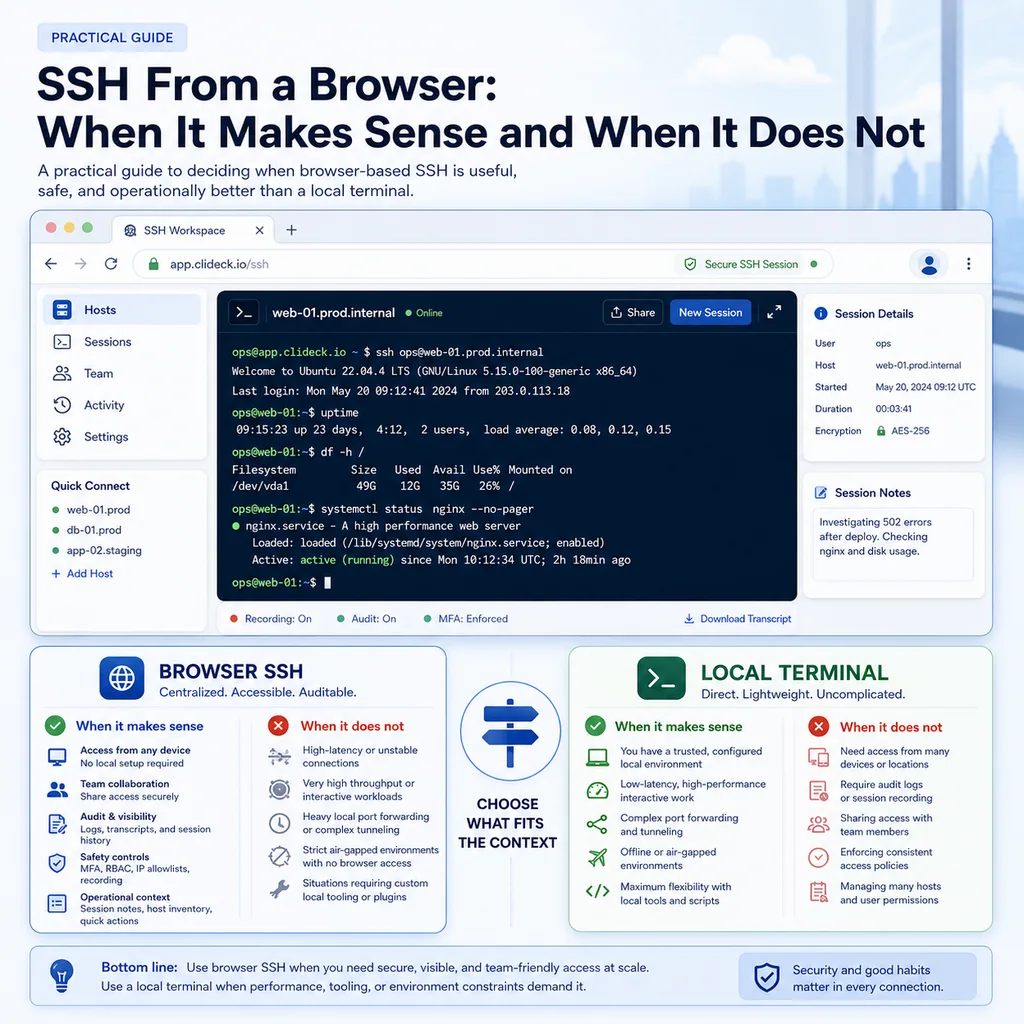
SSH From a Browser: When It Makes Sense and When It Does Not
Short answer
SSH from a browser is a good fit when terminal work needs shared access, notes, logs, runbooks, or a consistent workspace. A local terminal remains the simpler choice for quick, single-user work that does not need that surrounding operational context.
What browser-based SSH means
Browser-based SSH usually means opening a terminal session through a web application instead of starting SSH directly from a local terminal app.
In a local workflow, an engineer might run:
ssh admin@example-server
In a browser-based workflow, the engineer opens a web workspace, selects a server or device, and starts the session from there.
The SSH connection may still use standard SSH underneath, but the operational experience changes. The session can be organized with notes, shared with teammates, grouped with related devices, or connected to a runbook-style workflow.
That difference matters most during real operations, not during simple one-off access.
When SSH from a browser makes sense
1. When multiple people need the same operational context
Browser-based SSH is useful when terminal work is not just one person typing commands alone.
Examples:
- An incident bridge where one engineer investigates and another observes.
- A maintenance window where a lead engineer wants visibility before a risky command is executed.
- A handoff between shifts.
- A junior engineer working with a senior reviewer.
- A remote device recovery where several people need to see the same output.
The main benefit is shared context. Instead of copying terminal output into chat every few minutes, the team can work around the same session, notes, and device state.
This does not mean everyone should be allowed to type. In a good workflow, roles should still be clear: who is driving, who is observing, who is approving, and who is documenting.
Related reading: https://clideck.com/blog/shared-terminal-sessions-how-to-collaborate-without-losing-control
2. When session notes matter as much as commands
During troubleshooting, the commands are only half the story.
You also need to know:
- Why the command was run.
- What changed before the issue started.
- Which checks already passed.
- Which commands were intentionally avoided.
- What the next engineer should verify.
- What rollback path is available.
A browser workspace can make this easier because notes and terminal sessions can live together. That helps prevent the common problem where the terminal has useful output, the chat has partial context, and the runbook is somewhere else.
For serious work, notes should capture decisions, not just output. “Restarted service” is less useful than “Restarted service after confirming no active migrations and verifying two healthy replicas.”
Related reading: https://clideck.com/blog/terminal-notes-that-actually-help-during-troubleshooting
3. When you are working from different computers
Local SSH setups often depend on one specific machine.
That machine may have:
- The right private key.
- The right terminal profile.
- The right jump host config.
- The right serial adapter driver.
- The right saved commands.
- The right VPN state.
- The right known_hosts entries.
That works well until the person with that laptop is unavailable.
Browser-based SSH can be useful when a team needs a more consistent access point across computers. A browser workspace can reduce the amount of local setup required before someone can help.
This is especially valuable for small infrastructure teams where people move between office desktops, personal laptops, lab machines, and remote support environments.
The goal is not to remove discipline. The goal is to avoid losing time because “the only working setup is on Alex’s laptop.”
4. When you need cleaner handoffs
Terminal handoffs are risky when context is missing.
A bad handoff sounds like:
“I’m logged into the switch. Try the next command.”
A safer handoff includes:
- Which device is open.
- Which account is being used.
- What commands already ran.
- What output looked normal.
- What still looks suspicious.
- What command should run next.
- What command should not run yet.
- How to roll back.
A browser-based SSH workspace can help if the session, notes, and related devices are already organized in one place.
That is especially useful when work spans multiple systems: one terminal for a server, one for a switch, one for a firewall, and one for a console session.
Related reading: https://clideck.com/blog/command-handoffs-how-to-pass-terminal-work-to-another-engineer-safely
5. When you want less local terminal clutter
During an incident, engineers often open many terminal tabs quickly.
After ten minutes, it becomes easy to lose track of:
- Which tab is production.
- Which tab is staging.
- Which tab is the old session.
- Which tab is connected through a jump host.
- Which tab is currently safe to type into.
Browser-based workspaces can help by grouping sessions around the job instead of around a local terminal window.
For example, a maintenance workspace might contain:
- The target server.
- The backup server.
- A network device.
- A runbook.
- Session notes.
- A checklist of verification commands.
This structure reduces the chance that an engineer types a command into the wrong place.
Related reading: https://clideck.com/blog/how-to-avoid-working-on-the-wrong-server-or-network-device
6. When contractors or temporary operators need limited access
Temporary access is hard to manage cleanly.
A contractor may need to:
- Run a defined checklist.
- Capture output.
- Avoid unrelated systems.
- Work only during a maintenance window.
- Leave behind enough notes for review.
Browser-based SSH can be helpful when access is tied to a controlled workspace instead of giving someone a broad local SSH setup that lives on after the job.
This does not replace identity management, least privilege, or access reviews. It simply gives the team a more structured place to manage the work.
Related reading: https://clideck.com/blog/ssh-access-checklist-for-contractors-and-temporary-operators
7. When serial console and SSH work need to sit side by side
Real infrastructure work often mixes SSH with serial console access.
For example:
- SSH is down, but console still works.
- A switch is reachable by SSH before a change, but only console after a mistake.
- A router needs bootloader recovery.
- A firewall upgrade requires both SSH checks and console fallback.
- A lab device needs serial access before management networking exists.
A browser-based workspace can be useful when SSH sessions, serial console sessions, notes, and runbooks are part of one operational flow.
This is one of the places where browser workflows can be stronger than a traditional terminal-only setup.
Related reading: https://clideck.com/blog/browser-based-serial-console-vs-traditional-terminal-apps-practical-tradeoffs
When a local terminal is better
1. When you are doing personal development work
For everyday development, a local terminal is often faster and more natural.
Examples:
- Editing code.
- Running test suites.
- Using local scripts.
- Managing dotfiles.
- Running complex shell pipelines.
- Using tmux, vim, local agents, or custom keybindings.
If the session is personal, low-risk, and heavily tied to your local environment, a browser workspace may add unnecessary friction.
A browser SSH workflow shines more during shared operational work than during private development routines.
2. When you need offline access
A browser-based SSH tool depends on browser availability and whatever network path the workspace requires.
A local terminal can be better when:
- You are on an unstable connection.
- You are working in a restricted environment.
- You are connected directly to a local device.
- You need emergency access without relying on a web application.
- You need to work when the browser workspace is unavailable.
For field work, it is smart to keep a local fallback available. Browser tools can improve the normal workflow, but recovery plans should not depend on only one access method.
3. When policy requires direct local access
Some organizations have strict rules about administrative access.
They may require:
- Direct SSH from managed laptops.
- Specific endpoint controls.
- Approved local key storage.
- A particular bastion host.
- A specific audit path.
- No browser-mediated access.
In those environments, do not treat browser SSH as automatically acceptable. Check the policy first.
The right question is not only “is this technically secure?” It is also “does this match the organization’s access model and audit requirements?”
4. When the browser becomes another place to lose focus
Browser-based tools can make operations cleaner, but only if the workspace is disciplined.
They can become messy if engineers open too many tabs, mix unrelated jobs, or treat browser terminals casually.
A bad browser workflow can still create the same old problems:
- Wrong device.
- Wrong tab.
- Missing notes.
- No owner.
- Unclear rollback.
- Commands pasted without review.
The browser does not create safety by itself. The workflow does.
5. When latency or keyboard behavior gets in the way
Some terminal tasks are sensitive to input behavior.
Examples:
- Full-screen terminal applications.
- Complex interactive installers.
- Text editors over SSH.
- Programs that rely on unusual key combinations.
- Sessions over poor network links.
- Very latency-sensitive command-line work.
A good browser terminal can handle many interactive tasks, but a local terminal may still feel better for some workflows.
For high-risk work, test the input behavior before the maintenance window. Do not discover during an outage that an important key combination does not behave the way you expected.
Safety questions before using browser SSH
Before using browser-based SSH for real infrastructure work, ask these questions.
Who can open the session?
Access should be intentional. Make sure the workspace does not make it too easy for the wrong person to reach the wrong device.
At minimum, the team should know:
- Who is allowed to connect.
- Which systems they can access.
- Whether access is permanent or temporary.
- How access is removed after the work.
Who can type?
Shared visibility is useful. Shared input can be dangerous.
In collaborative sessions, define the driver before work starts. Observers should not casually type into production sessions.
For risky work, use a verbal or written confirmation step before execution:
Target: core-switch-02
Command: reload in 10
Reason: scheduled maintenance rollback timer
Approved by: Maria
The point is not bureaucracy. The point is preventing accidental command execution.
What gets logged?
Session logs are helpful for troubleshooting, audits, and handoffs, but logs can also capture sensitive data.
Be careful with:
- Passwords.
- Tokens.
- Private keys.
- Customer data.
- Internal IP ranges.
- Secret environment variables.
- Configuration files containing credentials.
A useful logging habit is to capture operational evidence without turning logs into a secret dump.
Related reading: https://clideck.com/blog/ssh-session-logging-what-to-save-what-to-avoid-and-why-it-matters
How will you recover if the session fails?
Before a risky change, know your fallback.
That may include:
- A second SSH path.
- Serial console access.
- A rollback command.
- Out-of-band management.
- A remote hands contact.
- A scheduled reload rollback.
- A known-good configuration backup.
Browser SSH is one access path. It should not be the only recovery plan for important work.
Related reading: https://clideck.com/blog/how-to-prepare-a-remote-device-before-a-risky-network-change
Practical examples
Good fit: maintenance window with several devices
A small team needs to update routing on two switches and verify services on three servers.
Browser-based SSH can help because the work benefits from:
- One organized workspace.
- Multiple sessions grouped together.
- Shared visibility.
- Notes beside the terminals.
- A checklist of pre-checks and post-checks.
- Cleaner handoff if the work runs long.
This is a strong use case because the value is not just “SSH in a browser.” The value is coordination.
Good fit: incident response
A service is down, and two engineers need to investigate quickly.
One engineer checks the server. Another watches logs and updates notes. A third person reviews the next command before it is run.
Browser-based SSH can help reduce back-and-forth because everyone can see the same operational state.
The team should still avoid chaos. Assign one driver per terminal and keep notes focused on facts, commands, and decisions.
Good fit: remote support for a device with fragile access
A remote appliance has unstable network access. SSH works sometimes, but serial console may be needed if the device drops off the network.
A browser workspace that keeps SSH, serial console, and notes together can be operationally useful.
This is especially helpful when the person who understands the device is not physically near it.
Poor fit: private coding session
An engineer wants to SSH into a development VM, edit files, run tests, use custom shell shortcuts, and keep a long tmux session open.
A local terminal is probably better.
There is no major collaboration need, no special handoff requirement, and no operational advantage to moving the session into a browser.
Poor fit: emergency access with no dependency tolerance
If the browser workspace itself is unreachable, blocked, or not approved during an emergency, local terminal access may be safer.
For recovery procedures, always keep a fallback path that does not depend on the same systems you are trying to fix.
Browser SSH decision checklist
Use browser-based SSH when most of these are true:
- More than one person needs visibility.
- The work needs notes, review, or handoff.
- Multiple devices are involved.
- The session is part of an incident or maintenance window.
- You need a cleaner workspace than many local terminal tabs.
- Temporary or role-based access matters.
- SSH and serial console workflows need to be organized together.
Prefer a local terminal when most of these are true:
- The work is personal and routine.
- You depend heavily on local tools.
- Offline or direct access is required.
- Browser access is not approved by policy.
- Interactive terminal behavior must be exact.
- There is no collaboration, logging, or handoff benefit.
Common mistakes to avoid
Treating browser SSH as automatically safer
Browser-based SSH can support safer workflows, but it does not guarantee them.
You still need:
- Clear access rules.
- Least privilege.
- Good session naming.
- Careful copy-paste habits.
- Notes that explain decisions.
- A rollback plan.
- A way to remove access later.
The tool helps most when the team already has a disciplined process.
Opening too many sessions without naming them
A browser full of unnamed terminals is not much better than a desktop full of unnamed terminal tabs.
Use clear names:
prod-db-01 - read only checks
edge-fw-02 - planned rule update
core-sw-01 - console fallback
A few seconds of naming can prevent a serious wrong-device mistake.
Pasting multi-line commands without review
Browser or local terminal, this is always dangerous.
Before pasting:
- Confirm the target.
- Read the full command.
- Watch for hidden line breaks.
- Avoid pasting secrets.
- Prefer one command at a time for risky work.
- Confirm whether the command executes immediately.
Related reading: https://clideck.com/blog/safe-copy-paste-habits-for-ssh-and-serial-console-work
Forgetting the recovery path
Before changing network settings, firewall rules, SSH configuration, routes, boot settings, or storage configuration, ask:
If this command disconnects me, how do I get back in?
If the answer is unclear, stop and build the recovery path first.
Final recommendation
Browser-based SSH makes the most sense when terminal access becomes team operations work: shared context, multiple devices, session notes, handoffs, maintenance windows, incident response, and recovery workflows.
A local terminal is still excellent for individual, low-friction, deeply customized command-line work.
Use the browser when it makes the work clearer, safer, and easier to coordinate. Use the local terminal when it is simpler, faster, and more reliable for the task.
The best SSH workflow is not the one with the newest interface. It is the one that helps your team avoid mistakes when the command actually matters.
Who this is for
This guide is for network engineers, operations teams, field technicians, and lab engineers who need to use the workflow described in “SSH From a Browser: When It Makes Sense and When It Does Not” safely and repeatably on SSH, serial, browser terminal, and infrastructure operations workflows.
When to use this
Use this guide when:
- Several commands or checks must be repeated safely.
- Another engineer, customer, onsite technician, or vendor may need context.
- The work should produce notes, logs, verification, or a clear handoff.
When not to use this
Do not use this guide when:
- You do not own or have authorization to work on the device.
- The device is outside your approved change, recovery, or processing scope.
- The task may expose customer data, secrets, licenses, or credentials that you are not allowed to view or store.
- The work requires vendor-specific approval, legal approval, or a customer-specific procedure that is not covered here.
Practical runbook format
A runbook does not need to be a complex script. For many operations, it can be a plain command list with notes, expected output, stop conditions, verification steps, and rollback instructions.
What to include
- Purpose
- When to use it
- When not to use it
- Target system or device
- Access path
- Read-only checks
- Change steps
- Expected output
- Stop conditions
- Rollback steps
- Verification steps
- Handoff notes
- Final summary format
Workflow
- Define the purpose, target device, access path, and approved scope.
- Run read-only checks first and record the expected healthy state.
- Execute commands from the runbook or handoff plan while watching for stop conditions.
- Verify the final state with independent checks.
- Summarize commands run, outputs reviewed, exceptions, and handoff notes.
Verification checklist
- The target device or system is correct.
- Read-only checks were captured before the work.
- Stop conditions and rollback notes were available before changes.
- Final verification checks match the expected result.
- Notes, logs, and handoff summary are stored where the team can find them.
Common mistakes
- Starting commands before confirming the target device and scope.
- Skipping read-only baseline checks.
- Copying commands without expected output, stop conditions, or rollback notes.
- Closing the work without a final verification summary.
CliDeck workflow fit
CliDeck Workspace is designed for this kind of operational workflow. Teams can keep terminals, notes, runbooks, logs, and shared sessions in one browser workspace instead of spreading work across terminal windows, chat messages, screenshots, and separate documents.
FAQ
Does a runbook need to be code?
No. A useful runbook can be a plain list of commands, checks, notes, expected output, stop conditions, and verification steps.
Why use a browser workspace for terminal work?
A browser workspace can keep terminals, notes, runbooks, logs, and shared sessions together, which helps during incidents, handoffs, maintenance windows, and remote support.
Can shared terminal sessions be safer than screen sharing?
Yes, when implemented with clear view/type permissions. The helper can see the relevant terminal context without taking over the operator’s entire desktop.
Can CliDeck help with this workflow?
Yes. CliDeck Workspace helps organize terminals, runbooks, notes, logs, and shared sessions. Console Server Go is useful when the workflow starts at a rack-side console port.
Related guides
- Browser Terminal Workspaces for Maintenance Windows - How to organize browser terminal workspaces for maintenance windows with sessions, notes, runbooks, logs, handoffs, and verification checks.
- Linux Serial Disconnects: Collect the Right Boot and Time Window - Collect Linux serial-disconnect evidence from a specific boot and UTC time window while preserving journal permissions, retention and kernel-only limits.
- Junos NTP Checks: Peers, Reach and Synchronization State - Capture Junos NTP peer selection, octal reach and system synchronization status before correlating device timestamps or starting maintenance.
- Linux Serial Permissions: Check Identity, Groups and ACLs - Inspect Linux serial-device identity, groups, node permissions and ACL masks before changing access or opening the console port.
- Catalyst 9300 Boot Checks: Running Image versus Next Reload - Compare Catalyst 9300 running software with current and next-reload boot variables, preserving manual-boot context before maintenance.